scooter.hx
Interactive find-and-replace
- Stars: 126
- Last commit:
- Created:
Interactive find-and-replace
scooter.hx is Scooter's native Helix plugin. It
embeds the same scooter-core engine as the
Scooter TUI, so searching,
selection, previews, and replacement follow the TUI's behaviour. The window
and all of its styling are rendered natively by Helix, using your Helix theme.
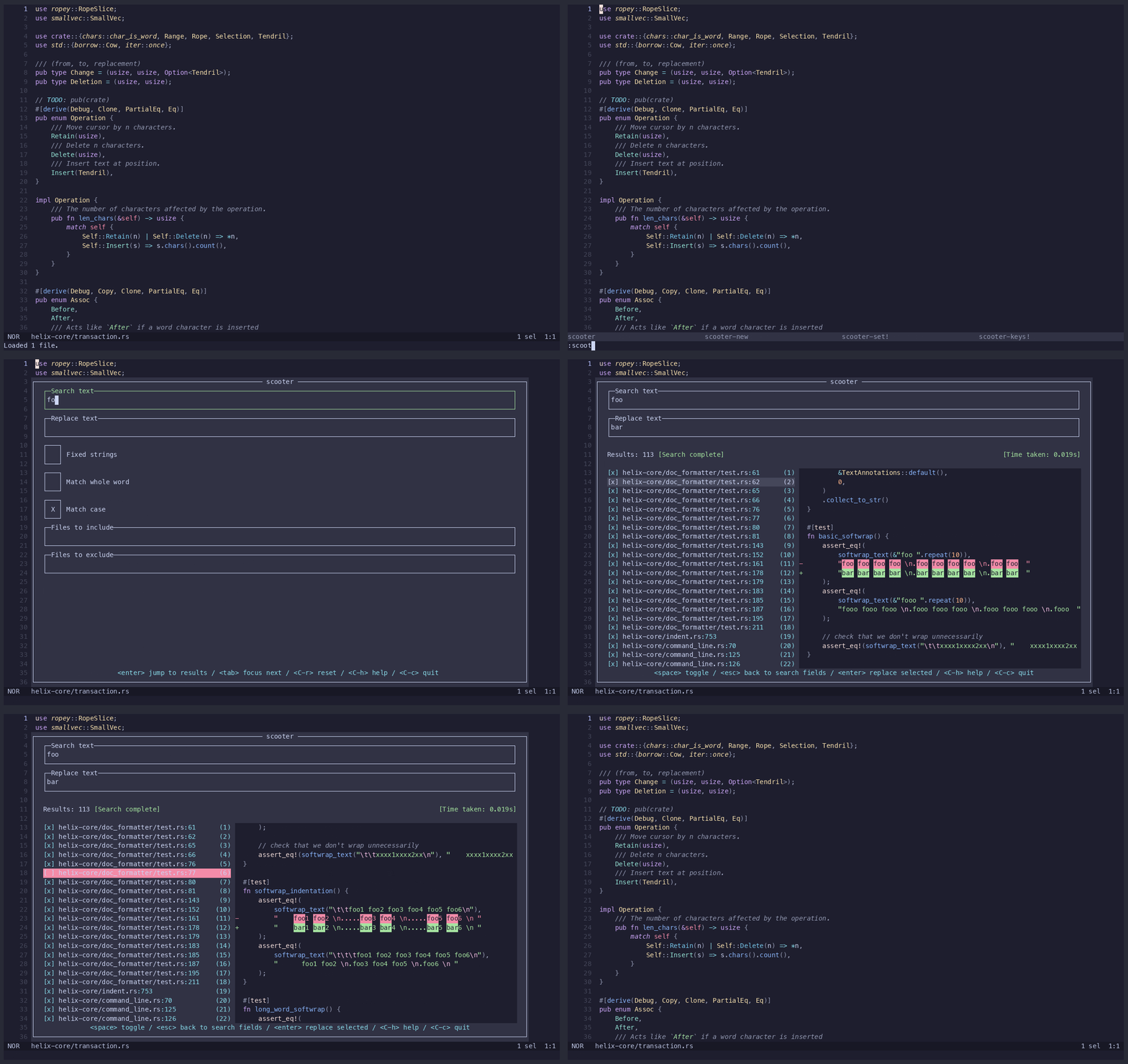
scooter.hx requires Helix built from its
steel-event-system
branch and the Steel toolchain installed from that checkout (including
cargo xtask steel). Follow that branch's
Steel instructions.
The native dylib must use the exact steel-core and steel-derive revision
that Helix uses. This repository pins
24cd21598c091fb88bc10a6375a1ded25e677c37;
changing the pin independently can make Helix reject the dylib at load time.
Add the following after installing with either method below:
(require "scooter/scooter.scm")
Put it in Helix's init.scm (normally under ~/.config/helix/).
forge pkg install --git https://github.com/thomasschafer/scooter.hx.git
git clone https://github.com/thomasschafer/scooter.hx.git
cd scooter.hx
cargo steel-lib
For a source checkout, require the checked-out Scheme file instead:
(require "/absolute/path/to/scooter.hx/scooter.scm")
:scooter opens a new session or resumes the current one.:scooter-new cancels the current session and starts again with fresh
fields and the current configuration.Press C-h in the window for the full keymap.
To hide the window, hit A-h - the search and any background
work continue, and :scooter resumes that session. C-c quits instead,
cancelling work and discarding the session. After replacement results, both
hide bindings hide the window too.
When the results list is focused, e opens the selected match in Helix and
hides the window; A-o opens it in the background and leaves the window open.
After a replacement completes, scooter.hx reloads every open, non-dirty Helix
buffer so its contents are current.
Configure scooter.hx in init.scm, after its require line. Settings are
captured when a session is created: they apply to the first :scooter with no
active session, or to :scooter-new; a hidden session retains its existing
settings until then.
| Setting | Value | Default | Effect |
|---|---|---|---|
multiline | boolean | #f | Allow search patterns to match across line boundaries. |
hidden | boolean | #f | Include hidden files and directories. |
advanced-regex | boolean | #f | Enable Scooter's advanced regular-expression engine. |
include-git-folders | boolean | #f | Search Git metadata directories when hidden files are also enabled. |
escape-sequences | boolean | #f | Interpret \n, \t, and \\ in replacement text. |
wrap-text | boolean | #f | Wrap long preview lines. |
syntax-highlighting | boolean | #t | Highlight preview context with Helix runtime grammars and your Helix theme, rendered on the editor background (a deliberate difference from the TUI). |
window-size | number, 0.5–1.0 | 0.9 | Set the window size as a terminal ratio. |
runtime-dir | string path | Helix runtime discovery | Override the runtime used to load preview syntax grammars; otherwise discovery checks HELIX_RUNTIME, then Helix's config-directory runtime (~/.config/helix/runtime). |
(scooter-set! 'multiline #t)
(scooter-set! 'wrap-text #t)
(scooter-set! 'syntax-highlighting #f)
(scooter-set! 'window-size 0.85)
(scooter-set! 'runtime-dir "/path/to/helix/runtime")
(scooter-keys! "path" bindings) replaces one action's bindings. bindings may be one string or a list of strings, using the standard Helix syntax: modifiers are S-, C-, and A-. The path omits the leading keys..
(scooter-keys! "search.results.move_down" '("j" "down"))
Plugin-only bindings use the same function. plugin.open_in_editor_bg must not collide with a core binding reachable on the search screen; plugin.hide may overlap core bindings, which take precedence in their active context.
Bindings are written in Helix's key syntax.
| Binding path | Default key(s) | Description |
|---|---|---|
general.quit | C-c | Exit scooter |
general.reset | C-r | Cancel in-progress operations, reset fields to default values and return to search screen |
general.show_help_menu | C-h | Show the help menu containing keymaps |
plugin.hide | esc, A-h | Hide Scooter when core has no action for the key in the current context; core bindings take precedence. |
plugin.open_in_editor_bg | A-o | Open the selected result in Helix without hiding Scooter. |
results.quit | enter, q | Exit scooter. This is in addition to the quit command in the general section. |
results.scroll_errors_down | j, down, C-n | Navigate to the error below |
results.scroll_errors_up | k, up, C-p | Navigate to the error above |
search.fields.focus_next_field | tab | Focus on the next field |
search.fields.focus_previous_field | S-tab | Focus on the previous field |
search.fields.trigger_search | enter | Trigger a search |
search.fields.unlock_prepopulated_fields | A-u | Allow editing of prepopulated search fields. |
search.results.back_to_fields | esc, C-o | Move focus back to the search fields |
search.results.flip_multiselect_direction | A-; | Flip the direction of the multiselect selection |
search.results.move_bottom | G | Navigate to the last search result |
search.results.move_down | j, down, C-n | Navigate to the search result below |
search.results.move_down_full_page | C-f, pagedown | Navigate to the search result a page below |
search.results.move_down_half_page | C-d | Navigate to the search result half a page below |
search.results.move_top | g | Navigate to the first search result |
search.results.move_up | k, up, C-p | Navigate to the search result above |
search.results.move_up_full_page | C-b, pageup | Navigate to the search result a page above |
search.results.move_up_half_page | C-u | Navigate to the search result half a page above |
search.results.open_in_editor | e | Open the selected result in Helix and hide Scooter. |
search.results.toggle_all_selected | a | Toggle whether all results will be replaced or ignored |
search.results.toggle_multiselect_mode | v | Toggle whether multiselect mode is enabled |
search.results.toggle_selected_inclusion | space | Toggle whether the currently highlighted result will be replaced or ignored |
search.results.trigger_replacement | enter | Trigger a replacement |
search.toggle_hidden_files | C-t | Toggle inclusion of hidden files and directories, such as those whose name starts with a dot (.) |
search.toggle_interpret_escape_sequences | A-e | Toggle interpretation of escape sequences in replacement text (\n becomes newline, \t becomes tab, \ becomes backslash) |
search.toggle_multiline | A-m | Toggle multiline search mode, which allows patterns to match across line boundaries |
search.toggle_preview_wrapping | C-l | Toggle wrapping of lines that don't fit within the width of the preview |
scooter-set! or scooter-keys! is a free identifierThis error (Cannot reference an identifier before its definition) means Helix
is loading a version of scooter.hx from before v0.2.0. Versions of forge
installed before September 2026 don't update their cached clone, so
forge pkg install --git ... --force reinstalls the old version. Update forge,
then reinstall scooter.hx:
cargo install --git https://github.com/mattwparas/steel.git steel-forge --locked --force
forge pkg install --git https://github.com/thomasschafer/scooter.hx.git --force
The native library must be built against the same Steel revision as Helix and
installed into the STEEL_HOME used by Helix. For a source checkout, run
cargo steel-lib and check that its output says it copied
libscooter_hx into $STEEL_HOME/native. Fully quit and restart Helix after
installing an update because each Helix process keeps its loaded library in
memory.